
Strong contrast helps readers see your message. Pair color with words or symbols so everyone can understand the information.
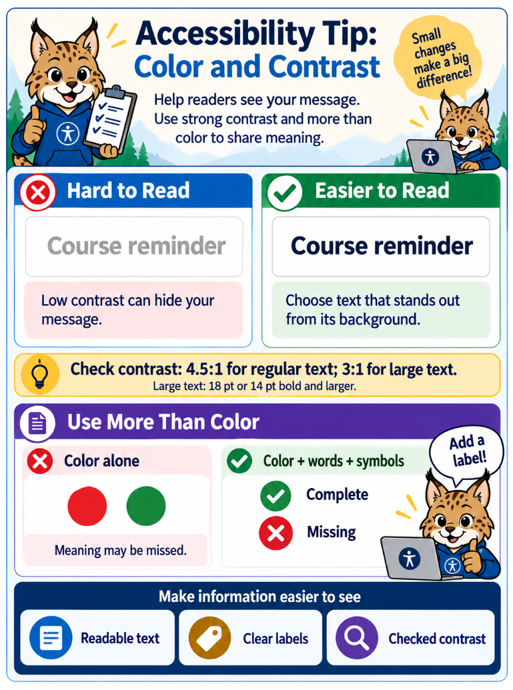
Graphic concept and direction by Rosanna Miiller Salas. Created with OpenAI image generation tools using custom prompts.
Infographic recap: Use text that stands out from its background. Aim for at least 4.5:1 contrast for regular text and 3:1 for large text (18 pt or 14 pt bold and larger). Add labels or symbols, such as a check mark with “Complete,” instead of relying on color alone.
Why?
Readable text and clear visual cues support people with low vision or color vision differences. They also help when readers encounter glare, dim screens, or unfamiliar color conventions.
Do:
Check text and background colors with a contrast checker. Use at least 4.5:1 for regular text and 3:1 for large text. Add words, symbols, or patterns to color-coded information, and underline links so color is not their only cue.
Avoid:
Avoid pale text on light backgrounds, text over busy images, and directions such as “select the green option” without another identifier. A color combination that looks clear to you may still need adjustment.
Try it this week!
Choose one Canvas page, slide, or newsletter. Test one text and background combination, adjust it if needed, and add a label to any information communicated only through color.
Resources
Let’s Connect!
Interested in exploring digital accessibility, have questions, or want to discuss your ideas? I’m here to help! Reach out to learn more or schedule a consultation.
Contact sehdhelp@ucdenver.edu with your accessibility request or directly Rosanna Miiller Salas at: rosanna.miillersalas@ucdenver.edu
Small changes can create more inclusive digital experiences for everyone!